Licensing & Trial
Trial, free plan, and license activation
Overview
PasteSuiteAI offers a generous trial and a permanent free plan. Non-AI features — such as Paste as Plain Text, local regex transforms, and static text paste — are always free with no usage limits, regardless of your license status.
| Phase | Duration | AI Actions | Notes |
|---|---|---|---|
| Trial | 7 days | Unlimited | Starts on first launch. No sign-up required. |
| Free | Indefinite | 15 per rolling 24h window | Escalating cooldowns as limit approaches. |
| Licensed | As long as license is valid | Unlimited | Key stored in OS keychain. |
Trial Period
A 7-day trial starts automatically on the first launch of PasteSuiteAI. During the trial:
- All AI features are available without any restrictions.
- No credit card or account is required.
- No upsell prompts appear.
After the trial ends, the app automatically transitions to the Free plan. The trial start date is stored securely in your OS credential store.
Free Plan
After the trial expires, you can continue using AI features within a rolling 24-hour usage window:
- 15 AI actions per rolling 24-hour window.
- Brief cooldowns between actions as the limit approaches.
- Cooldowns reset automatically as older actions age out of the 24-hour window.
Pro — Pricing & Subscription
The Pro license is an annual subscription. The current price is €29 per year, incl. VAT where applicable. The subscription renews automatically each year at the then-current price; you can cancel anytime, and your current paid year stays active until its end.
- Scope of the license: A Pro key is for one single user and may be activated on up to 6 of your personal devices. Re-installing PasteSuiteAI on a device you have already activated does not count against this. The license is non-transferable and may not be shared with other people.
- One key for life of subscription: Your license key is issued once at purchase and stays the same across every renewal. When your subscription auto-renews, the App refreshes the new period in the background the next time it launches — you do not need to copy a new key from email or re-activate any device.
- Seller of record: Purchases are processed by our Payment Provider, which acts as the merchant of record and issues the invoice.
- Manage or cancel: Use the Payment Provider customer portal link included in your purchase confirmation email. Your license remains valid for the remainder of the paid year after cancellation.
- Refunds & right of withdrawal: See the Terms of Service and the withdrawal instructions the Payment Provider provides during checkout.
Multiple Licenses & Team Purchases
Buying for more than one person? The checkout supports any quantity. You always receive one license key by email, and the number of devices that key can be activated on scales with the number of licenses you purchased — larger orders unlock more devices for your organisation.
A single license is for one user and may be activated on up to 6 of that user’s personal devices. When you order multiple licenses in one go, the same key covers all the people in your team and the device cap grows accordingly. The buying organisation is responsible for keeping use within the number of licenses purchased.
License Activation
A license key removes the daily AI action limit and cooldown delays. To activate:
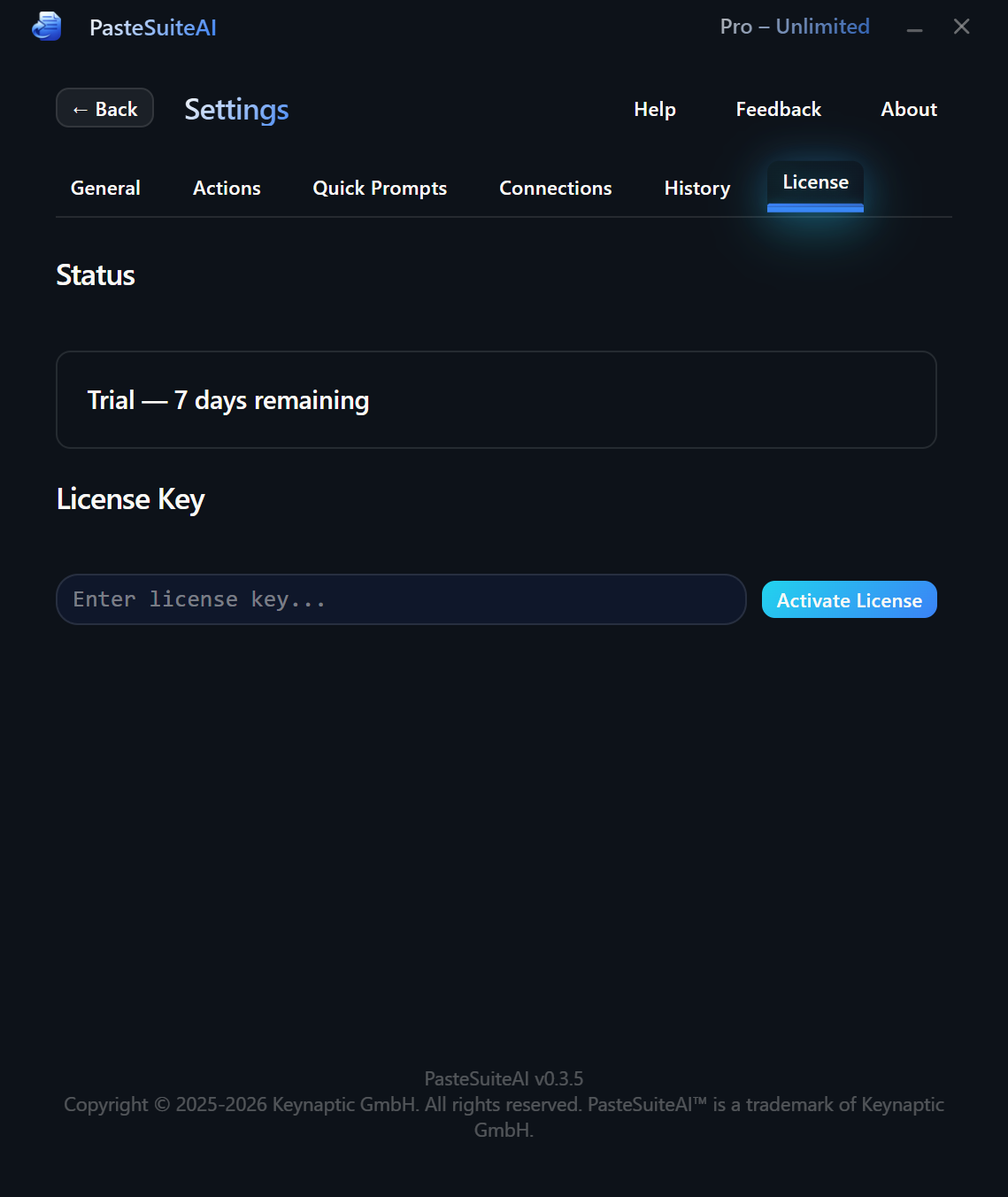
- Open Settings and go to the License tab.
- Enter your license key in the input field. Keys use the format
PASTEAI-…. - Click Activate or press Enter.
- A confirmation message shows your licensed email and expiry if applicable.
| Control | Description |
|---|---|
| License Key input | Enter your PASTEAI-… key here. Visible only when not licensed. |
| Activate button | Submits the key for verification. Also triggered by pressing Enter in the input. |
| Deactivate button | Removes the license key from the OS keychain. The app reverts to the free plan. Visible only when licensed. |
| Pro badge effect toggle | Cosmetic option (licensed users only). Enables an animated gradient effect on the Pro badge in the title bar. Default: on. |
Technical details about license verification:
- Online activation. Entering a key requires an internet connection so the key can be activated for your device. After activation, the signed key is cached locally and does not require a constant connection for day-to-day use.
- Secure storage. The key is stored in your OS secure credential store. It is never written to disk as plain text.
Paywall Behavior
When you hit the daily AI limit, PasteSuiteAI uses a graduated, non-intrusive approach:
Soft Banner
Appears on the first time you hit the daily limit within a 7-day period. The banner shows at the top of the main panel and is dismissible. It includes:
- An Upgrade button that switches the banner to inline activation mode, letting you enter a license key without opening Settings.
- A dismiss button with an optional countdown (you may need to wait a few seconds before dismissing on first appearance).
Strong Modal
Appears on the second or later limit hit within a 7-day window. A more prominent dialog shows usage statistics and a call-to-action to enter a license key. Features:
- A CTA button that switches to inline activation mode directly in the modal.
- A dismiss button to close the modal and continue with the free plan.
- Clicking the backdrop also dismisses the modal.
- A cooldown between strong paywall appearances prevents it from showing on every single action once the limit is hit.
Usage Display
Your current license status is visible in the main window title bar as a compact badge:
- Trial: shows days remaining (e.g., "6 days left").
- Free: shows actions used vs. the daily limit (e.g., "8 of 15").
- Licensed: shows a "Pro" badge with an optional animated gradient effect.
The full breakdown is available in Settings › License: phase, trial days remaining, actions used today, daily limit, licensed email, and license validity period.
Safety Limits
Separate from licensing, PasteSuiteAI includes a daily API call safety limit that applies to all users (trial, free, and licensed). This prevents runaway API costs if an automation bug or long action chain misbehaves.
| Setting | Default | Range |
|---|---|---|
| Daily API Call Limit | 500 | 10–100,000 |
The counter resets at midnight UTC each day. When the limit is reached, all AI actions are blocked until the next UTC day. Configure it in Settings › General › Safety.
Non-AI Features (Always Free)
- Paste as Plain Text — strip formatting and paste clean text.
- Local Regex Transform — run regex-based text transformations locally.
- Static Text Paste — paste pre-defined text snippets.
- Clipboard History — in-session history of clipboard changes and action results.
- Global hotkeys & mouse triggers — all trigger configuration and assignment.
- Prompt Library — organize and access prompts via the overlay.
- All settings & customization — UI scale, themes, connections, actions.